
Search the complete directory
- Enter a product, brand or category in the homepage search, then press Search or Enter. Results come from the complete 183-item directory, including items outside the homepage selection.
- Try a specific term such as
pufferto compare matching jacket records, orhoodiefor a broader shortlist. - Use a category link if you want shoes, hoodies, knitwear, T-shirts, jackets or bottoms only. Searching within a category stays inside that category.
Want a copy to organise yourself? Download the full CSV or Excel spreadsheet, or open Saved in the directory to export only your favourites as CSV.

A worked search: find a hoodie under 15 dollars
Here is a reproducible route through this catalog, using the current recorded snapshot. Start on All finds so an earlier category choice does not limit the search.
| Action | Result | What it means |
|---|---|---|
| Search hoodie | 41 matching finds | Matches the name, label, category and selection note. This is a text search, not an exact category filter. |
| Open the Hoodies category | 40 finds | Only records filed under Hoodies. A hooded jacket can appear in text search while belonging to Jackets. |
| Search hoodie, then set Item budget to Under $15 | 9 matching finds | This includes source USD estimates marked with ~. The cap is strictly below 15 USD, before delivery and fees; confirm the selected option price. |
Open the hoodie search with the $15 cap and price sorting →
A colour word can also occur in a comparison note. For an exact grey item, check the card photo and the selected source option rather than assuming every result for “grey hoodie” is grey. If the result count looks wrong, clear both the search and budget before choosing a category.
The $12.11 entry passes a price filter; it still needs size measurements and a current listing check. Read the original hoodie notes before treating it as a finished choice.
Filter Vigorbuy finds by recorded size and QC
Use a category page when a size label matters. Shoes have separate EU/EUR, US and number-only groups; clothing uses its own recorded labels. All finds and the budget edit let you filter QC, while size choices stay inside a category.
A worked example: S-labelled hoodies below 30 dollars
- Open Hoodies.
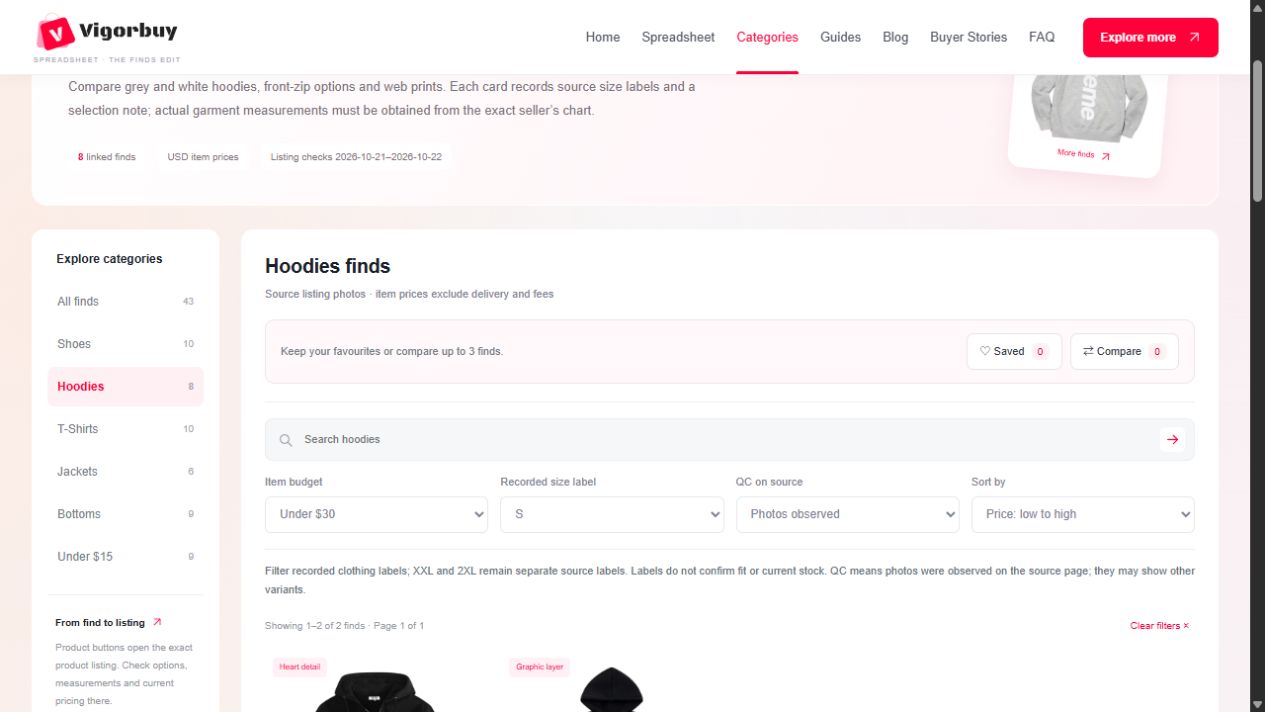
- Choose S under Recorded size label and Under $30 under Item budget.
- Set QC on source to Photos observed, then sort by Price: low to high.
The current records give 2 results: Black Heart-Logo Zip-Up Hoodie at $12.11 and Black Spider Web Print Oversized Hoodie at $29.59. Their sources include an S label; we have not measured these garments or checked current stock. These prices are item references, before delivery and fees.
When QC changes the shortlist
On T-Shirts with S and Photos observed, the current directory returns 6 finds. This means a photo section was observed on each source page at the recorded check, not that the selected size was inspected or that your order passed QC. Open the group and match the exact colour and version using the QC example.
Why “EU 42” and a plain “42” can give different results
An explicit EU42 or EUR42 label enters the EU/EUR group. A source option written US8.5=EUR42 contributes those two explicitly stated labels. A plain 42 stays in the number-only group because our record does not state its system. There is no calculated US-to-EU conversion here.
Clothing labels also remain source-specific. XXL and 2XL are separate choices; an M in a label such as M (30–31) can be found under M, with the full wording retained on the card. The size guide explains why a matching letter still needs measurements.
Filtering applies across the whole category, including later pages. The address retains the selected conditions for refresh or sharing. Clear filters resets search, price, size, QC and sorting within that collection; it does not expand a category into All finds or change the full-catalog downloads.
Compare price, style and measurements
- Use Item budget for a reference-price limit and Sort by to compare prices from low to high. Filters apply across the entire directory or the category you opened, including later pages.
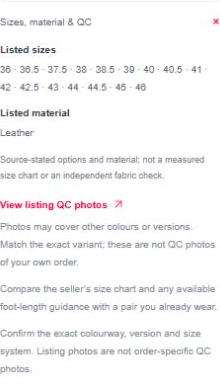
- Expand Sizes, material & QC. The card gives recorded size labels, not measured garment dimensions. Obtain chest and length for tops, waist and inseam for bottoms, or the exact model’s size guidance for shoes from the seller.
- Use the numbered page links to see the rest of the matching items. Clear filters to return to the current collection.
Use Save on a card to keep a favourite, or select Compare on up to three finds. Open Saved or Compare above the grid to review your choices across categories and pages. Saved and Compare are separate: to export an item, add it to Saved and use Export saved CSV there. Comparing alone does not save it. These lists stay on this browser; they do not sync between devices and are removed if you clear browser data. The controls require JavaScript.
Working with a $15 item limit? The under-$15 edit has its own shortlist. Prices must be strictly below $15 USD; delivery and fees are extra.

Open and verify the exact listing
Select View product, the product photo or the product name. The linked product listing opens in a new tab. Match its colour, version and size options with what you intended to choose.
- Review the card’s listed size options and source-stated material, then compare actual measurements on the seller’s listing. Use the exact seller’s measurement chart for sizing.
- Check the buying options and original seller link, where provided. If you intend to use Vigorbuy, confirm that buying route and the selected agent before paying. If there is no usable source link or supported route, verify it before proceeding.
- Where available, the card’s QC link opens the source listing’s QC section. Photos can include other colours and versions; match the exact item and order. Listing photos and AI try-on are not order-specific QC.
Review the complete cost before paying
The number on a card is an item-price reference in US dollars (USD), recorded on the displayed check date. It is not a delivered-order quotation.
| Cost to check | What to confirm |
|---|---|
| Item and selected option | Current price for your exact colour, size and version. |
| Domestic delivery | Whether delivery to the agent’s warehouse is included or charged separately. |
| Agent and payment costs | Any applicable charges and the currency conversion shown at payment. |
| International shipping | The actual parcel’s weight, dimensions, destination and available route. |
| Destination charges | Whether applicable taxes or duties are prepaid or still payable. |
Example: a $14.35 item is within a $15 item-price limit. It does not mean the order can be delivered for $15. Confirm what is already included so you do not count a charge twice.
A quick final checklist
Use these checks before continuing on your chosen agent’s site.
The ticks are a checklist for this visit; they do not submit an order.