
Listing photos, QC photos and AI try-on
QC means quality control. The photo label alone does not tell you who photographed the item, which variant it is, or whether it belongs to your order.
Check which kind of photo you are looking at before using it to assess an item.
| Photo type | Useful for | Limit |
|---|---|---|
| Source listing photo | The advertised design, colour and visible features. | May represent a sample or another option; it is not evidence of your order. |
| Shared QC photo | Visible details of the photographed item, when its listing and variant can be matched. | Can belong to a different colour, version, batch or buyer. |
| Your order’s QC | The item photographed for your particular order, if the order and variant identifiers match. | Still limited by the angles, lighting and information supplied. |
| AI try-on | A generated styling illustration. | Cannot verify construction, condition, measurements or exact fit. |
Browsing photos and your own order
Shared photos can help you identify a version. For your own purchase, match the order reference, colour and size on the photos before judging the item.
Keep the exact option label with the product link; it makes a request for another view much easier to understand.
Open the QC section, then match the variant
- Choose a find in the spreadsheet directory and expand Sizes, material & QC.
- If a QC section was confirmed, select View listing QC photos. The source section opens in a new tab.
- Compare the exact colour, version and selected option with each photo group. A group labelled Other or only a SKU number needs more identification.
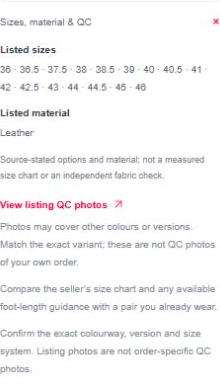
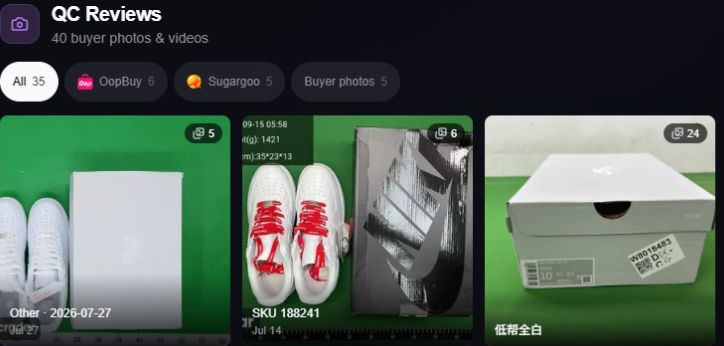
The current records mark photos observed on 40 of 183 source pages. Individual source checks are dated 2026-10-21–2026-10-23; newer API records have not had their QC albums checked. The screenshot above is the earlier capture.
Reading the three photo groups
The screenshot has three groups. They need different checks.
01 “Other” — the white pair
- Visible
- A white pair and a box appear in the thumbnail. The group label says “Other”.
- Unknown
- The label alone does not establish the selected version, size or order.
- Next check
- Open the group and look for a matching option or item identifier. If that connection is missing, ask which variant these photos belong to.
02 “SKU 188241” — the red laces
- Visible
- The thumbnail shows red laces, unlike the white pair in our directory image. A SKU number is shown.
- Unknown
- We have not established what that SKU means. The colour difference does not prove that somebody received a wrong order.
- Next check
- Confirm the SKU-to-variant mapping. Until it matches, do not use this group as evidence for the selected all-white pair.
03 “低帮全白” — the labelled box
- Visible
- The label describes a low-top all-white variant, but the thumbnail mainly shows the box.
- Unknown
- The box view does not establish the condition, construction or measurements of the shoes inside.
- Next check
- Look through the actual item views in that group. A plausible variant label is an identification lead, not a completed inspection.
These notes describe the displayed thumbnails, not a buyer’s order.
Inside the all-white album: four actual views
We opened the group labelled 低帮全白 (low-top all-white) on 22 October 2026. The viewer contained 24 photos at that visit. Below are photos 1, 2, 3 and 6 as displayed in the public viewer. Photo numbers belong to this captured ordering and can change later.
These are shared source photos, not our order. The album label is a useful way to find the relevant colour, but it does not establish that every image is the same pair, size, batch or buyer’s order. Keep the identifiers for your own order separate.
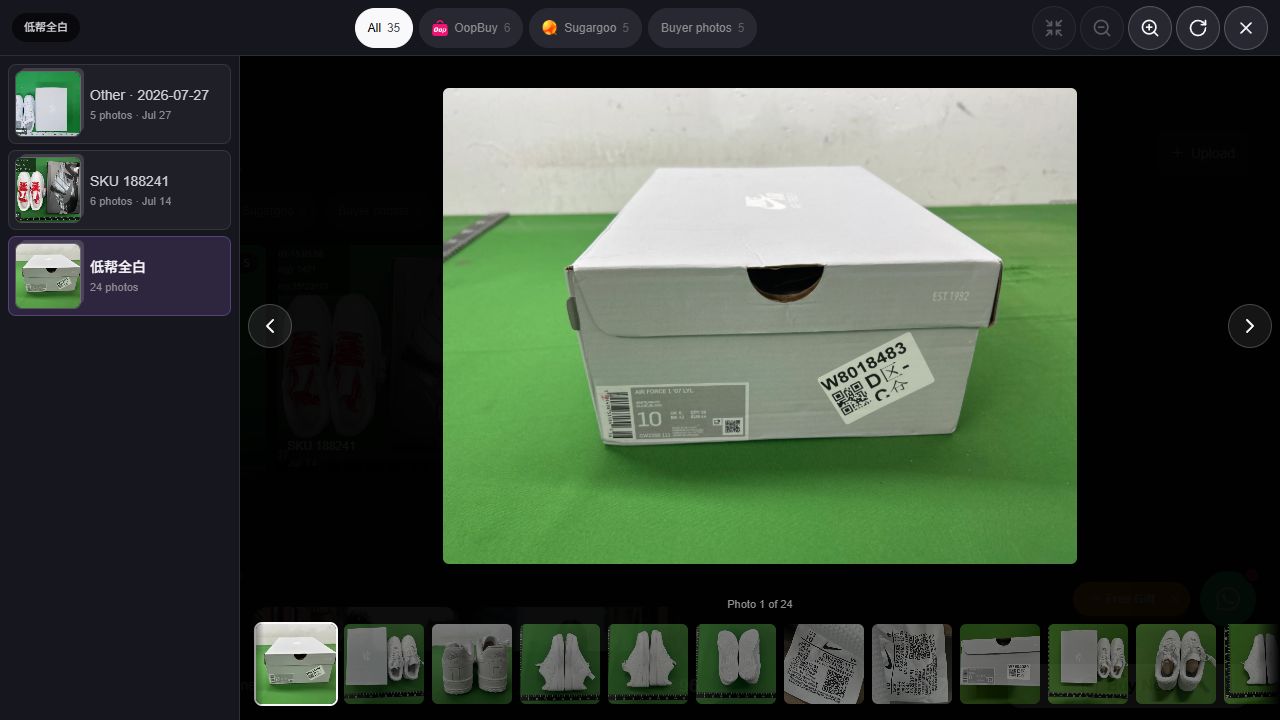
1. The box gives you a label to check, not a shoe inspection
The front of a grey box and a printed end label are visible. This is useful for asking whether the box label matches the option you selected. It does not show either shoe, the inside size labels, the uppers or the soles.
A matching box label would still need to be connected to the actual photographed pair. For your own order, ask for the item and its relevant label together if that connection is missing. Do not select your size from the number on somebody else’s box.
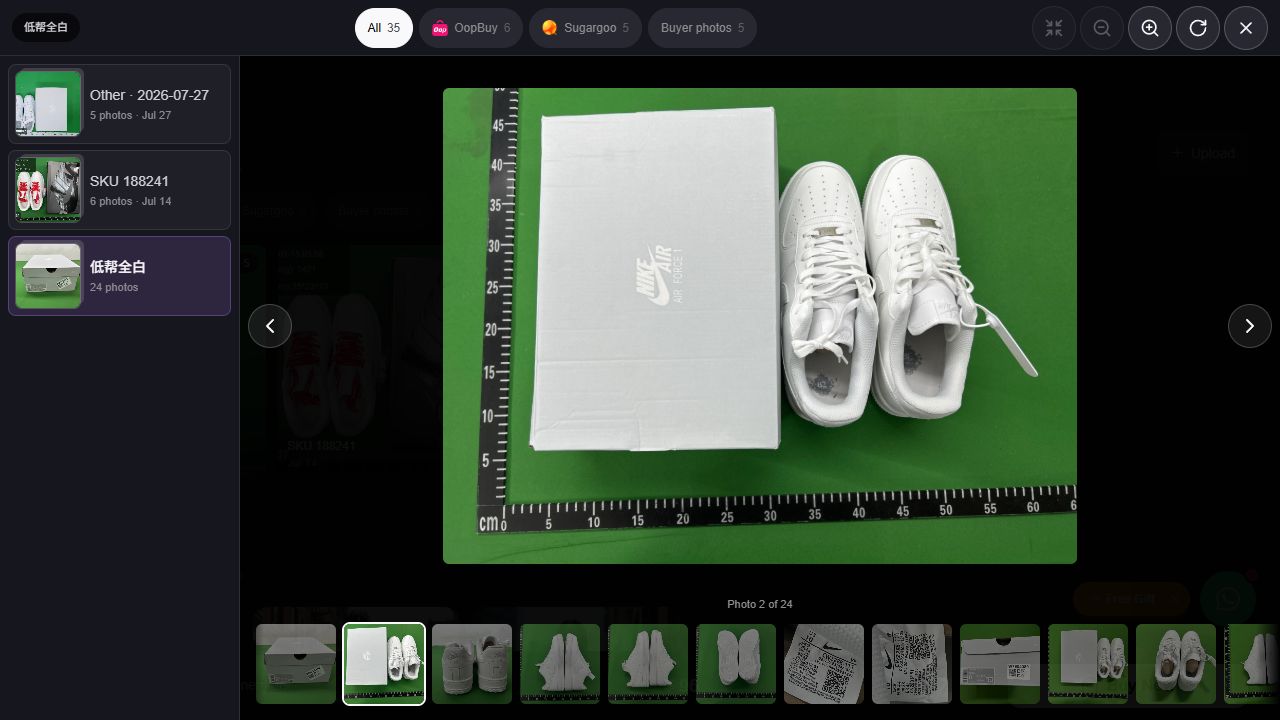
2. The overview answers the colour-and-shape question
Both toe boxes, the laces and the shoe openings are visible. The pair is white, unlike the red-laced thumbnail in the separate SKU 188241 group. That makes this a more relevant view for inspecting an all-white option.
Use this angle to compare the toe shape, lace arrangement and obvious differences between the two shoes. It does not show every side panel or the underside. A ruler runs around the mat, but it has not been placed along an insole with defined endpoints. Reading the mat is not an internal shoe-length measurement.
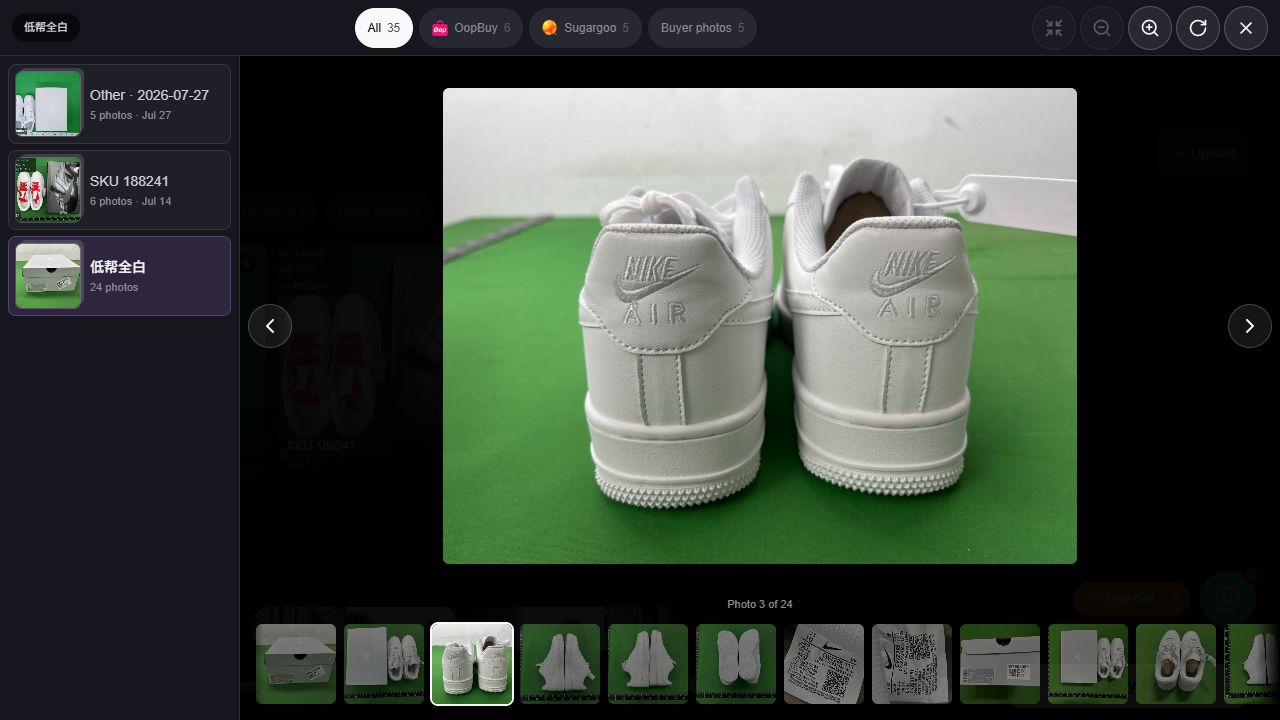
3. The heel view adds a different inspection surface
The rear patches, embroidered lettering, vertical centre seams and sole bands can now be inspected. These details were largely hidden in the top view. Keep the two shoes together in the frame when comparing their placement.
The shoes do not sit at precisely the same angle or distance from the camera. An apparent height or alignment difference therefore needs a level, square-on view before it is treated as a construction problem. This capture alone is not enough to label the pair defective or to authenticate it.
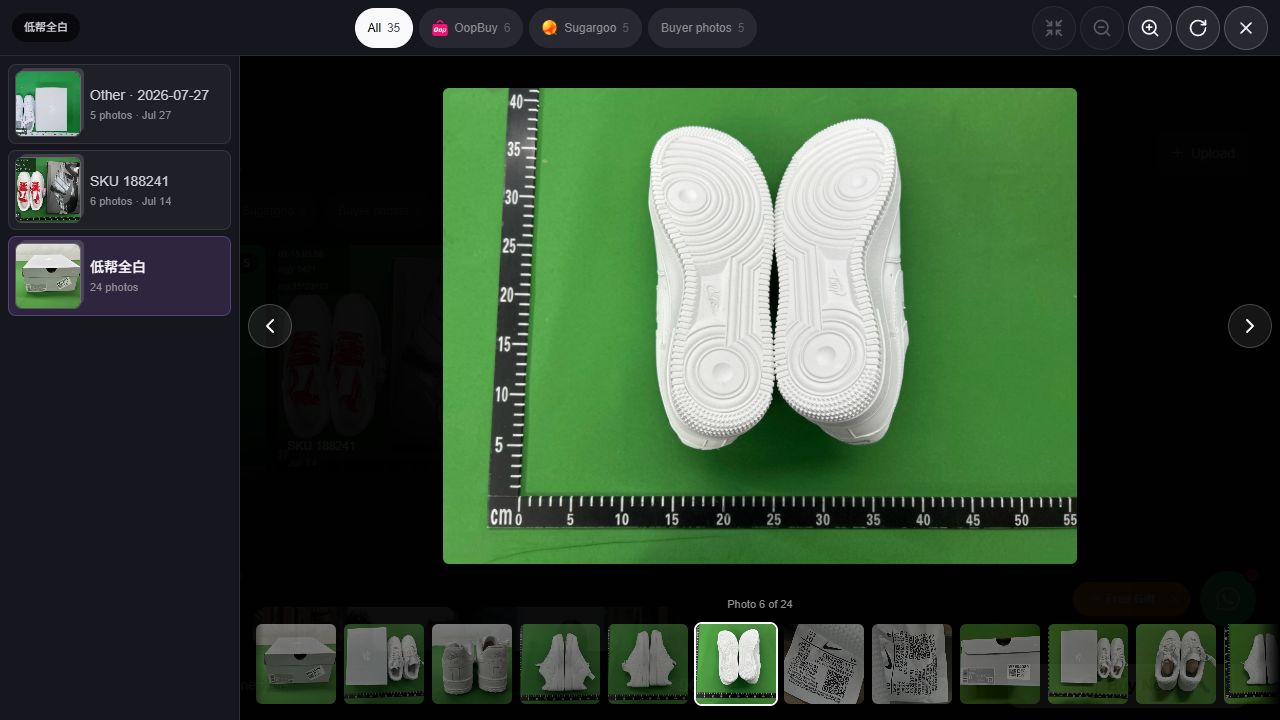
4. The outsole view adds tread, not a grip test
Both soles face the camera. Circular tread patterns, grooves and the outer edges are visible. This is the angle to examine visible marks, missing-looking sections or a discrepancy between the two soles, while keeping image resolution in mind.
The photo does not measure grip, rubber durability, flexibility or cushioning. Nor is the outside length on a mat the same as the space available for your foot. Request a separate measurement with the method you need if sizing is still unresolved.
What this sequence resolves — and what to ask for next
| Question | Evidence in these captures | Next evidence if needed |
|---|---|---|
| Does an all-white pair appear? | Yes, in the top, heel and outsole views. | Match your exact option and order identifier. |
| Are the backs and soles shown? | Yes. They add surfaces not visible in the box or top photo. | A square-on or closer view for a particular detail. |
| Is this the size I should buy? | Not established. The ruler mat does not measure usable internal length. | Exact model’s size guidance and a clearly defined measurement. |
| Are all 24 photos one order? | Not established by the shared group label. | Matching item, size and order references. |
| Can I approve my own order now? | These are not order-specific evidence for your purchase. | Your agent’s photos and the action deadline for your own order. |
A specific follow-up is easier to answer: “For my selected all-white pair and size, please show both shoes from above, both heels square to the camera and the inside size labels. I also need [the missing measurement] with the start point, end point and units visible.” Remove any views you already have, and replace the brackets with the measurement you actually need.
Five listing checks: does the album match the option?
On 22 October 2026 we opened these five source pages and their original seller links. The table records option labels and visible album groups. Photo counts belong to those groups, not to our own purchases. Only the all-white shoe has a directly aligned group label in this check; that still does not identify a future order.
| Catalog item and option | What the source groups establish | Original seller page |
|---|---|---|
| Air Force 1 White Sneakers 低帮全白 (low-top, all white) | The 低帮全白 group is labelled for the all-white option and contains 24 photos. SKU188241 has 6; Other has 5. Keep those groups separate. Label-aligned group; not an inspection of your order | The original seller page asks you to choose a model; its initial summary reads 1;36. That line does not identify the all-white option. Original seller listing ↗ (opens in a new tab) |
| Air Jordan 4 Black Sneakers Black Cat 2020 | The named group is White Thunder (9 photos); the other group is Other, dated 28 July 2026 (6 photos). Neither label establishes a match to Black Cat 2020. Current black option not matched | The original seller page combines several colourways. Its initial model summary reads Kaws grey;US7=EUR40, which is not the black entry. Original seller listing ↗ (opens in a new tab) |
| Grey Hoodie with White Logo BB28 | Grey groups include 010灰色 (8 photos) and 007灰色 (5 photos). Their codes do not establish a match to BB28. The original seller detail also mixes a grey chest-graphic QC collage with back-lettering model photos. BB28 to grey album mapping not confirmed | The original seller page initially shows BB01;S. Its grey chest-graphic collage is a different visible design from the catalog back-lettering image. Original seller listing ↗ (opens in a new tab) |
| Grey Zip-Up Hoodie 33 | Groups are Other, dated 23 August 2026 (4 photos), Other, dated 2 August 2026 (5 photos), and Other (4 photos). None identifies option 33. Option 33 not matched to an album | The original seller page initially shows 01;S. Confirm option 33 rather than treating another model summary as the selected zip-up. Original seller listing ↗ (opens in a new tab) |
| Dark Denim with Embroidered Pockets 黑色牛仔裤 (black denim trousers) | Other, dated 25 August 2026 (5 photos), and Other, dated 11 July 2026 (4 photos), do not identify the selected trouser option. Black trouser option not matched | The shared seller page includes jackets and trousers. Its initial summary reads 蓝色外套;S (blue jacket; S); that does not identify the pictured jeans or a two-piece set. Original seller listing ↗ (opens in a new tab) |
A shared page can show the right colour and the wrong design
The back-lettering hoodie is a concrete example. Its original seller detail includes a grey hoodie collage with a red chest graphic and a plain back, followed by model photos with large back lettering. Both are grey, but the visible designs differ. The collage cannot establish the construction, front closure or measurements of BB28.
Likewise, “White Thunder” cannot establish the black shoe option, and “Other” leaves identity unresolved. Keep an unmatched album available as context; do not turn its existence into “this option passed QC”. For your order, match the order number, selected option, size and actual item photos before assessing a particular mark or seam.
“Photos observed” is a source check, not an order inspection
The directory records photos observed on 40 of 183 source pages, from listing checks dated 2026-10-21–2026-10-23. That count tells you where a QC section was found. It does not mean we inspected 40 purchased items or matched every album to every available size.
QC remained unconfirmed in the earlier page review for Balenciaga Black T-Shirt with Small Logo (checked 2026-10-21); Gucci Doraemon Graphic T-Shirt Black (checked 2026-10-21); Chrome Hearts Cross Print Black T-Shirt (checked 2026-10-21). This records a gap in our check, not a finding that the products are defective or that no photos can ever appear.
The 140 newer source API records have not had their size charts or QC albums checked individually. They remain Not confirmed here; an API photo count alone does not establish an inspected or matching album.
| What you see | What the evidence supports | Next check |
|---|---|---|
| Red laces in a shared group beside an all-white listing | There is a visible colour difference between those images. | Identify the variant before treating the group as evidence for the all-white option. |
| Only a box or a size label | The photographed label and box are visible. | Ask for both actual shoes and match their order/option identity. A box alone cannot show the pair’s condition or fit. |
| A possible mark in one view | Something needs a clearer view; lighting or an obstruction may affect the appearance. | Request a close-up and another angle of the same area. Do not turn an unclear image into a confirmed defect. |
| A ruler mat behind the shoes | The photograph has a background reference. | For fit, obtain the relevant measurement with explicit endpoints; the mat does not supply internal shoe length. |
Use Photos observed to browse the recorded QC sources, or Not confirmed to see entries where the check did not establish a photo section. These filters organise source records; neither approves an order.
If someone asks whether an item is “GL or RL” (green light or red light), start with identity and the specific concern. These public examples cannot approve another person’s order. Keep the exact photo, option and unresolved question together when asking the service handling your item.
Useful photo requests by product type
More photos are useful when they fill a specific gap. Start with an overview, then request the detail needed to answer your question.
| Item | Views to request when needed | What remains uncertain |
|---|---|---|
| Shoes & slides | Both items together; each side; toe and heel views; outsole; the selected size label. Ask for an insole measurement only if that is the comparison you need. | A label or ruler does not establish comfort, authenticity or a universal EU/US conversion. |
| Hoodies & T-shirts | A complete front and back; the relevant print, seams and cuffs; flat chest and length measurements with the tape endpoints visible. | A folded or stretched garment is difficult to compare with an unstretched flat measurement. |
| Jackets | Front and back; closure area; cuffs and hem; lining if relevant; the measurements needed for your intended layering. | A static photo does not demonstrate a working zip or prove insulation, weather resistance or fabric composition. |
| Jeans, shorts & sweatpants | Front and back laid flat; waistband and closure; the relevant pocket details; waist, rise, inseam or total length using a stated method. | For an elastic waist, “waist size” is ambiguous until you know whether the band is relaxed, stretched, a width or a circumference. |
Read the ruler, not just the last number
Check that the tape lies along the intended measurement, both endpoints are visible, and the units are clear. A tape starting at a non-zero mark needs the start reading subtracted from the end reading.
The example explains the arithmetic. It does not verify a real photo, garment or seller chart. An angled camera, hidden endpoint or stretched fabric still leaves uncertainty.
For apparent colour or shape differences, compare similar angles and lighting where possible. A close-up can reveal a visible detail but can also hide the context. Keep the wider item view alongside it.
A useful QC photo checklist
A checklist for this page visit; nothing is submitted.
For clothing, request the relevant garment measurements if they are missing. For shoes, ask for the angles or size-label details needed to identify the selected version. A ruler photograph is useful only when its endpoints, units and measurement method are clear.
If the photos do not match
- Different colour or design: confirm the group’s variant before judging your chosen option.
- A ruler looks wrong: compare units, start and end points, then ask for a clearer measurement.
- Only a box or label: ask for the actual item view you need.
Be specific: “I selected all-white, but this group shows red laces. Which variant do these photos belong to?”
Pause the decision and ask for the missing evidence
If you see a different colour, an unidentified SKU or no useful measurement, do not fill the gap with an assumption. Ask the seller or chosen agent to identify the exact item and provide the missing view or measurement.
You can use this message as a starting point:
Please confirm that these photos belong to my selected item, colour, version and size. I still need [the missing view or measurement], shown with clear units and start/end points. Please also confirm any action deadline that applies to my order.
Check any request deadline with the service handling your order.
Review shoe finds · Review hoodie findsCommon questions
Where do I find Vigorbuy QC photos from this spreadsheet?
Expand “Sizes, material & QC” on a product card. Where photos were observed, the QC link opens the external source listing’s photo section. Confirm that the relevant group matches your selected variant.
Does “QC not confirmed” mean that no QC photos exist?
No. It means useful QC photos were not confirmed on the source page at our check. Ask the seller or agent about evidence for the exact item.
Can a QC photo tell me which size to buy?
A clear measurement photo can help compare a garment, but a size label or appearance alone is not enough. Match the measurement method with the seller’s chart and a garment you already wear.
Can I upload QC photos or approve an order here?
No. The Finds Edit is an independent discovery guide. Uploads, order decisions and agent services happen on the relevant external service.
About this example
Written by The Finds Edit from our 2026-10-21 directory review and a check of the public QC viewer on 22 October 2026. The four opened-album captures were taken on that later date. The screenshot illustrates photo labels and variant matching; it is not our purchase, laboratory test or authenticity assessment. Review the current source section ↗.